
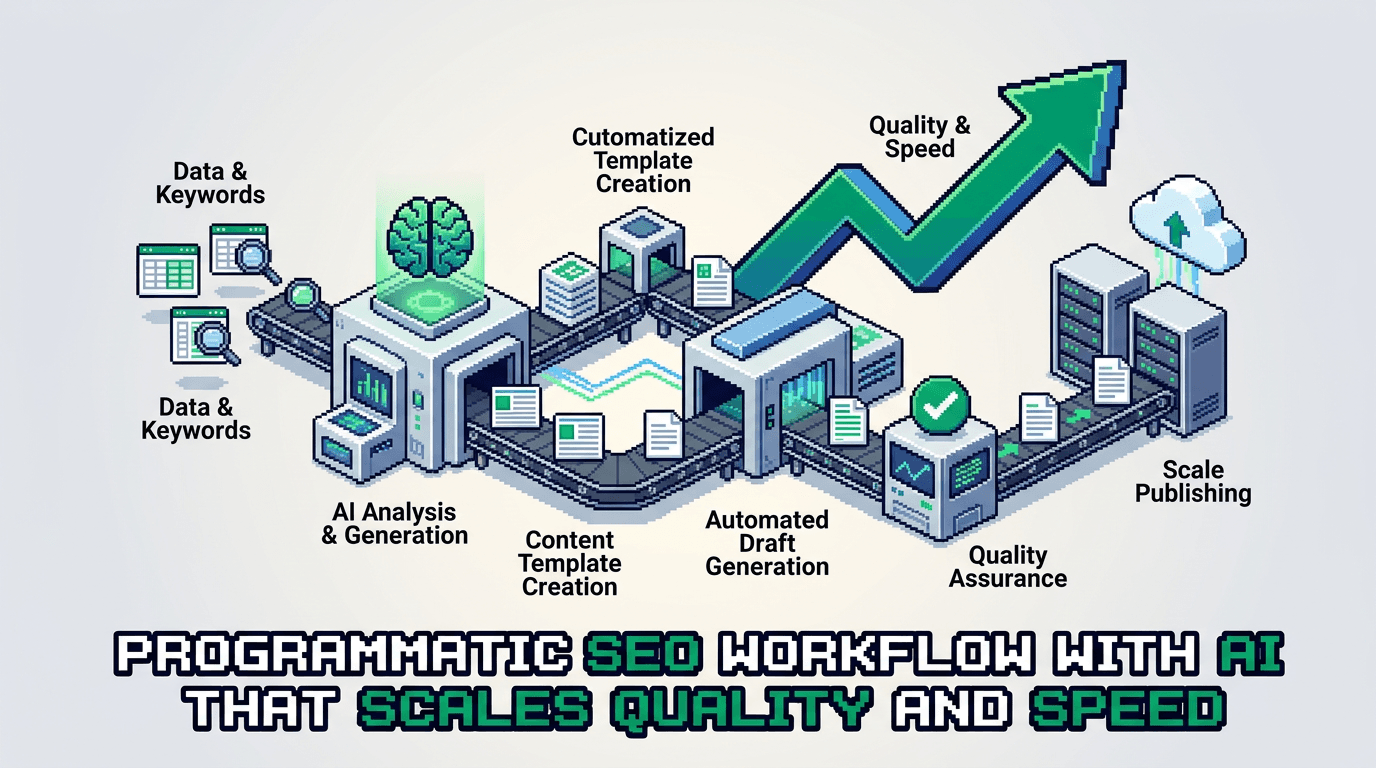
Great content at scale is a systems problem. Programmatic SEO solves scale, but quality dies without guardrails. This workflow uses AI to ship fast and keep standards high.
This post shows product operators and technical SEO teams how to design an AI powered programmatic SEO workflow. You will get architecture, roles, tools, prompts, schemas, QA checks, and distribution loops. Key takeaway: treat content as a data pipeline with automations and human gates.
Programmatic SEO architecture for technical products
Programmatic SEO succeeds when you turn topic models into structured data and templates. The system outputs consistent pages with useful variation.
Inputs and data model
- Seed entities: product features, integrations, industries, problems
- Attribute tables: audience, job to be done, region, pricing tier, platform
- SERP features: intent class, snippet patterns, People Also Ask clusters
- Content constraints: word ranges, headings, CTAs, compliance notes
- Canonical template IDs and component inventory
Define a content schema:
- page_id: string
- entity: string
- intent: {informational, navigational, transactional, comparative}
- outline: array of sections
- components: {intro, h2_blocks[], table_blocks[], code_blocks[]}
- metadata: {title, meta_description, primary_keyword, internal_links[]}
- qa_status: {draft, needs_review, approved}
Template strategy
- Base templates for comparison, how to, solution, glossary, and integration pages
- Variant slots for industry, region, and use case
- Componentized blocks: pros cons table, steps list, metrics callout, FAQ teaser removed from page body
- Strict heading rules: H2 top level, H3 nested, no H1
Rendering for SSR React
- Use file based routes with dynamic segment for entity and intent
- Hydrate JSON schema server side to HTML fragments
- Validate heading levels before render; fail build on violations
- Precompute internal link graph server side
AI in the lane: where to automate, where to gate
Automate generation and analysis. Gate positioning, claims, and examples with human review.
Automate
- Outline from entity and intent
- Draft sections that map to template components
- Title and meta suggestions with keyword variants
- Internal link candidates based on entity graph
- Fact candidates from source docs with citations
Human gate
- Positioning and messaging accuracy
- Proof of claims, stats, and examples
- Compliance, brand voice, and product fit
- Final acceptance checks and links
Roles and owners
- Growth engineer: builds pipelines, schemas, validators
- Editor operator: approves outlines, resolves claims
- SME: verifies product details and constraints
- Analyst: monitors metrics and flags drift
The workflow blueprint
Ship content like a data pipeline. One lane per page type. Version each artifact.
Lane 1: keyword and entity expansion
- Pull seed entities from product features and integrations.
- Query keyword APIs for modifiers and SERP intent.
- Cluster by entity and intent using cosine similarity.
- Store cluster_id, entity, intent, priority_score.
Acceptance: 80 percent of clusters show unique intent patterns when sampled.
Lane 2: outline and component plan
- Generate outline per cluster with H2 and H3 only.
- Map each outline node to a component type.
- Add acceptance tests to each node: min facts, examples, links.
- Persist as outline.json tied to page_id.
Acceptance: No empty nodes. All H3s have a parent H2. Read time within target.
Lane 3: draft generation with grounded prompts
- Build prompt with entity context, outline.json, product constraints, and citations.
- Generate each component separately to avoid spillover.
- Enforce length and heading rules in prompt.
- Store drafts as draft.md blocks with metadata.
Acceptance: Draft uses the primary keyword in first 100 words and at least one H2.
Lane 4: validation and linting
- Heading linter: H2 and H3 only; no H1
- Keyword presence checks; limit repetition
- Link checker for internal targets and 200 status
- Fact verifier flags claims without sources
- Style linter for sentence length and passive voice rate
Lane 5: human review and edits
- Editor resolves flags and adjusts positioning
- SME reviews product claims and examples
- Final pass for clarity and accuracy
- Mark qa_status to approved
Lane 6: SSR publish and index controls
- Render server side with canonical and structured data
- Add lastmod and priority to sitemap by intent
- Defer index on low confidence pages until signals improve
Prompts, schemas, and validators
Use minimal, strict prompts. Bind variables. Reject non compliant output.
Outline prompt snippet
You are a technical SEO editor. Produce an outline that uses only H2 and H3. Cover the entity and intent. Include acceptance checks per section. Return JSON.
Input: {entity, intent, audience, required_components}
Output keys: sections[], acceptance[]
Draft prompt snippet
You are a senior writer for product operators. Generate a section for {section_id}. Use active voice. Respect heading level. Include 1 metric and 1 concrete example. Max 180 words.
JSON schema validator
- Use a JSON Schema to validate outline.json and metadata
- Fail pipeline if unknown fields appear
- Log errors to CI output with page_id
Heading linter logic
- Parse markdown AST
- Assert no H1
- For each heading, current_level minus previous_level is at most 1
- Assert no H4 or deeper
Data sources and fact grounding
Ground AI with trustworthy inputs. Do not let it invent.
Allowed sources
- Product docs and changelogs
- Analytics dashboards and case studies
- Vendor docs for integrations
- Research datasets with citations
Retrieval setup
- Index sources with embeddings and metadata tags
- Retrieve top k passages per component
- Include citations inline in draft notes for editor review
Citation policy
- No stats without a source
- Prefer first party data
- Expire dated stats after 12 months
Distribution loops that compound growth
Content only grows if it moves. Build loops for each page type.
Internal linking system
- Generate link candidates from entity graph
- Place links in intro and first H2 where relevant
- Add breadcrumbs and related content modules
- Track click through rate by link position
External distribution lanes
- Syndicate summary threads to developer communities
- Pitch integration pages to partner newsletters
- Extract a visual from each comparison table for social
- Build a short tutorial version for docs
Email and activation
- Segment by role and feature interest
- Send a 5 line summary and a single deep link
- Trigger activation tasks in product with the same angle
Experiment loops and measurement
Run tight experiments. Keep metrics as acceptance gates.
Core metrics
- Organic clicks per page within 14 days of index
- Non branded impressions in top queries
- Scroll depth to final H2
- Internal link CTR out of the intro
- Assisted signups within 30 days
Test ideas
- Swap one H2 angle per variant
- Move the CTA from final H2 to after the first H2
- Compress read time by 15 percent and watch scroll depth
- Replace example with a product specific walkthrough
Review cadence
- Weekly: crawl errors, index coverage, and new flags
- Biweekly: update internal link graph with new pages
- Monthly: prune pages below threshold and merge intent overlap
Tooling stack and ownership
Pick tools that fit the pipeline. Keep owners clear.
Core tools
- Data and orchestration: Python, Node, Airflow or Dagster
- Content store: Git repo with Markdown and JSON
- Lint and tests: custom AST linters, JSON Schema, CI
- SSR React: Next.js or Remix with server components
- Search API: Search Console, third party keyword APIs
- Vector search: Postgres with pgvector or a managed store
Ownership map
- Pipeline owner: growth engineer
- Quality owner: editor operator
- Source owner: SME per product area
- Metrics owner: analyst
Example lane: integration comparison pages
A concrete example for product integrations.
Inputs
- Entities: {Slack, Teams, Discord}
- Attributes: {notification types, roles, security, pricing}
- Intent: comparative transactional
Outline
- H2: Overview and use cases
- H2: Setup steps and requirements
- H2: Feature comparison
- H2: Security and compliance
- H2: Pricing and total cost
- H2: Implementation checklist
Draft generation
- Generate each H2 block with a bound word range
- Insert a pros cons table component for each tool
- Add internal links to product setup docs
Here is the table format we use for pros and cons.
| Tool | Best for | Key pros | Key cons |
|---|---|---|---|
| Slack | Cross functional alerts | Rich app ecosystem; granular channels | No built in audit export |
| Teams | Enterprise compliance | AD integration; policy controls | Heavier setup |
| Discord | Community support | Open access; fast onboarding | Limited enterprise controls |
Acceptance: Each row includes a fit by use case. Editor validates claims.
Governance, versioning, and rollbacks
Treat content like code. Plan for breakage.
Versioning rules
- One PR per page_id change
- Changelog entry with date, reason, and metrics impact
- Keep drafts in branches until qa_status is approved
Rollback plan
- Revert to last green commit if traffic drops below threshold
- Restore internal link targets
- Add a postmortem to the page folder
Quality gates
- Block merge if heading linter fails
- Block publish if fact flags remain unresolved
- Block index if early metrics miss baseline
Common failure modes and fixes
Ship faster by learning from typical breaks.
Failure modes
- Intent drift from mixed modifiers
- Over templated copy with thin examples
- Broken internal links from renamed slugs
- Indexing throttled by quality signals
Fixes
- Re cluster terms with stricter thresholds
- Add product walkthroughs and screenshots
- Build a redirect map and link integrity tests
- Hold index until engagement clears baseline
Implementation timeline and resourcing
Plan a 90 day rollout. Start narrow. Expand after wins.
0 to 30 days
- Build schemas, linters, and outline generator
- Ship 10 pages in one lane
- Set baselines and acceptance gates
31 to 60 days
- Add draft generator with retrieval
- Launch internal link system
- Ship 30 more pages; prune overlap
61 to 90 days
- Add distribution loops and partner lanes
- Run two experiments per week
- Document playbook and train editors
What good looks like
Define success and measure it.
Leading indicators
- 90 percent of pages meet QA on first review
- Time to publish under 48 hours per page
- Internal link CTR above 10 percent
Lagging indicators
- 3x non branded impressions in 90 days
- 2x organic clicks to target lanes
- Higher assisted activation from page visits
Key Takeaways
- Treat programmatic SEO as a data pipeline with strict schemas and gates
- Use AI for outlines and drafts, and humans for positioning and proof
- Enforce heading and quality linting before publish
- Build distribution and internal link loops to lift discovery
- Measure with clear acceptance metrics and rollback quickly
Close the loop weekly. Keep shipping. Improve the lane with each release.