
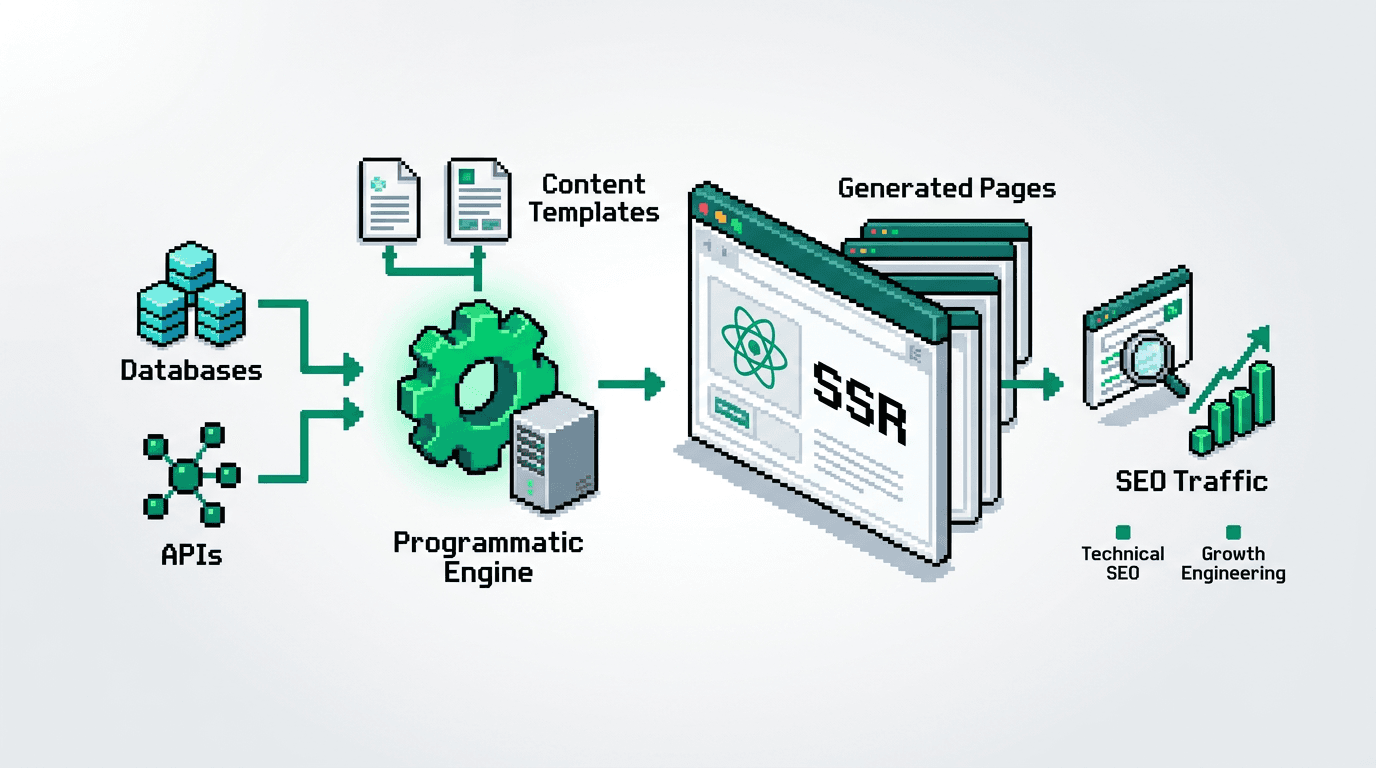
You can ship programmatic SEO at scale without bloated content ops. The constraint is not ideas. It is reliable systems.
This guide shows technical product teams how to design a programmatic SEO system for SSR React. You will model data, template pages, add QA gates, and run distribution and experiment loops. The key takeaway: treat SEO as an automated build pipeline with checks, not a content calendar.
What Is Programmatic SEO and When It Fits
Programmatic SEO creates many useful pages from structured data. It works when users search for repeatable patterns.
Fit criteria
- Demand pattern is repeatable and query intent is consistent.
- You have or can source clean structured data.
- Templates can serve unique value per page without thin duplication.
- You can maintain freshness via scheduled updates.
Misfit scenarios
- Ultra low volume queries with no clear pattern.
- Topics needing deep editorial nuance per page.
- No durable data source or unstable APIs.
Core components
- Data model that maps entities to query intents.
- Template system with SSR and partial hydration.
- QA gates for content, performance, and metadata.
- Publication, distribution, and experiment loops.
Architecture for SSR React Programmatic SEO
Goal: ship fast pages with consistent metadata, crawlable markup, and safe rollbacks.
Stack assumptions
- Framework: Next.js or Remix with SSR enabled.
- Data: Postgres or BigQuery plus a thin access layer.
- Rendering: React Server Components where available.
- Search features: server side metadata, sitemap generation, and stable URLs.
Routing and URL design
- One stable slug pattern per entity type.
- Avoid query params for canonical content.
- Include only tokens that users understand.
Example slug patterns:
- /topics/[topic]
- /tools/[tool]/alternatives
- /[city]/[service]
Server side rendering and caching
- Use SSR for first paint and meta tags.
- Cache HTML per slug at the edge with short TTL and revalidate on data change.
- Precompute critical JSON chunks for hydration.
Metadata and structured data
- Compute title, description, and canonical on the server.
- Output JSON-LD for the dominant schema type.
- Include pagination and breadcrumb markup when relevant.
Data Model and Content Design
Outcome: a schema that aligns entities and intents to page types with minimal duplication.
Define entities and relationships
- Entities: products, categories, locations, comparisons, how to guides.
- Relationships: product belongs to category, product compares to other products, location contains services.
Minimal schema (pseudo SQL):
create table products (
  id uuid primary key,
  name text not null,
  slug text unique not null,
  category_id uuid not null,
  price_range text,
  features jsonb,
  rating numeric,
  updated_at timestamptz default now()
);

create table comparisons (
  id uuid primary key,
  a_product uuid not null references products(id),
  b_product uuid not null references products(id),
  metrics jsonb,
  updated_at timestamptz default now(),
  unique(a_product, b_product)
);

create table categories (
  id uuid primary key,
  name text not null,
  slug text unique not null
);
Map intents to page types
- Category intent: best X for Y. Page type: ranked list with filters.
- Entity intent: X review or pricing. Page type: product profile.
- Comparison intent: X vs Y. Page type: side by side diff.
- Local intent: X in City. Page type: service directory.
Content blocks per template
- Intro that states selection criteria.
- Data table with attributes users care about.
- Pros and cons summarized from features.
- FAQs sourced from search autocomplete and site search logs.
- Related links to strengthen crawl paths.
Template System and Component Library
Goal: one template per intent, parameterized with data and rules.
Template rules
- Title formula: intent keyword + entity tokens + benefit.
- Description formula: unique value proposition in under 155 characters.
- H2 outline fixed per template to prevent drift.
- Internal links placed in predictable slots.
Component checklist
- <Head> with computed title, description, canonical, and Open Graph.
- Breadcrumbs that mirror the URL path.
- Table component that supports sorting and aria attributes.
- Pros and cons list from standardized fields.
- CTA block with event tracking ids.
Example Next.js server component snippet
export default async function CategoryPage({ params }) {
  const data = await getCategoryData(params.slug);
  return (
    <>
      <PageHead
        title={data.meta.title}
        description={data.meta.description}
        canonical={data.meta.canonical}
      />
      <Breadcrumbs items={data.breadcrumbs} />
      <h2>{data.heading}</h2>
      <Intro text={data.intro} />
      <SortableTable rows={data.rows} columns={columns} />
      <ProsCons pros={data.pros} cons={data.cons} />
      <Faq items={data.faq} />
      <Related links={data.related} />
    </>
  );
}
QA Gates That Prevent Thin or Broken Pages
Outcome: block bad pages before they reach crawlers. Approve only shippable quality.
Gate 1: data completeness
- Required fields present for title, description, and H2s.
- Minimum row count for tables per template.
- No placeholder strings.
Gate 2: content uniqueness
- Title similarity below threshold across the corpus.
- Description unique within intent group.
- Canonical conflicts resolved.
Gate 3: performance and Core Web Vitals
- LCP under target on mobile for cached HTML.
- CLS near zero for template.
- TTFB stable under load test.
Gate 4: index safety
- noindex by default in preview.
- Switch to index only after passing checks.
- XML sitemap includes only indexed pages.
Example preflight script
node scripts/validate-templates.js \
  --minRows=5 \
  --uniqueTitleScore=0.85 \
  --lcpBudgetMs=2500 \
  --output=reports/preflight.json
Publication Workflow and Rollbacks
Ship on a schedule, not ad hoc. Keep rollbacks trivial.
Promotion states
- draft: visible to editors only.
- preview: accessible via signed url, noindex.
- staged: deployed behind feature flag.
- live: indexed and in sitemap.
Rollback plan
- Feature flag per template or slug group.
- Revert sitemap atomically.
- Purge edge cache on rollback.
Acceptance checks before go live
- Template passes gates with recorded report ids.
- Canonical and hreflang resolve to 200.
- Internal link graph updated with no orphans.
Distribution Loops That Compound Reach
Distribution extends discovery beyond Google. Treat it like a pipeline.
Channel inventory
- Email digest to subscribers.
- LinkedIn threads for category or comparison posts.
- Developer forums for technical guides.
- Partner newsletters for niche directories.
Snippet automation
- Generate 3 snippets per post: list, stat summary, and quick tip.
- Export as CSV with character limits for each channel.
- Schedule with a 2 week cadence and UTM tags.
Simple distribution loop
- Publish 10 pages in a batch.
- Auto generate snippets and images.
- Schedule posts across 3 weeks.
- Collect click and engagement metrics.
- Feed top performing angles back into intros and H2s.
For channel constraints and best practices, see platform docs:
- Google Search Central: https://developers.google.com/search/docs
- Next.js SEO and metadata: https://nextjs.org/docs/app/building-your-application/optimizing/metadata
Experiment Loops and Measurement
Run tight loops. Change one variable per test.
North star metrics
- Indexed pages that receive clicks.
- Click through rate per template.
- Conversion per session from programmatic pages.
Leading indicators
- Crawl rate per directory.
- Time to first byte from edge cache.
- Similarity scores across titles.
Example tests
- H2 structure with or without a pros and cons block.
- Table column order affecting dwell time.
- Comparison page intro length variants.
Test protocol
- Define hypothesis and expected lift.
- Select 100 pages per variant if available.
- Split by slug hash, not by time.
- Run for at least two index cycles.
- Accept or revert with a changelog entry.
Reporting cadence
- Weekly: crawl, errors, and performance budget.
- Biweekly: CTR and rankings sample by template.
- Monthly: conversions and revenue attribution.
Minimal Blueprint: 30, 60, 90 Days
Outcome: working system with templates, data, and loops.
Day 1 to 30
- Map intents and entities. Finalize URL schema.
- Build one category and one entity template.
- Implement preflight QA gates.
- Ship 50 to 100 pages behind noindex.
Day 31 to 60
- Add comparison template.
- Integrate snippets export and schedule tool.
- Turn on index for best 50 pages after QA.
- Start two A B tests.
Day 61 to 90
- Scale to 500 to 1000 pages if metrics hold.
- Add local template if fit exists.
- Tighten Core Web Vitals budgets.
- Document rollback and runbooks.
Common Failure Modes and Fixes
Avoid predictable problems. Add guardrails.
Thin pages from sparse data
- Fix: increase min rows, add complementary sources, or block those slugs.
Duplicate intent collisions
- Fix: consolidate to a single template with filters and canonicalize others.
Slow pages at scale
- Fix: prerender hot slugs, cache aggressively, and remove non critical client JS.
Index bloat and crawl traps
- Fix: strict robots rules for facets, noindex previews, and static sitemaps per directory.
Unstable rankings due to template churn
- Fix: ship changes in cohorts, annotate in analytics, and hold versions for rollback.
Example Comparison Template Table
Use this compact table pattern for X vs Y pages that users search for.
| Feature | Product A | Product B | Best For |
|---|---|---|---|
| Pricing | $ | $$ | A: freelancers, B: teams |
| Core feature | Yes | Yes | Tie |
| Advanced feature | No | Yes | B |
| Support | 24 7 chat | B |
Ownership, Tools, and Artifacts
Define owners to prevent drift.
Owners
- Search architect: designs intent map and templates.
- Data engineer: maintains pipelines and quality checks.
- Frontend engineer: builds SSR components and caching.
- Growth operator: runs distribution and experiments.
Tools
- Framework: Next.js or Remix.
- Data: Postgres, BigQuery, or Supabase.
- Index checks: Google Search Console and server logs.
- Experimentation: Split by slug hash with your analytics tool.
Artifacts
- PRD for each template with acceptance criteria.
- Preflight reports stored per deploy.
- Distribution calendar with UTM matrix.
Programmatic SEO Checklist for SSR React
Use this as a release gate before scaling beyond 100 pages.
- Intents mapped to stable URL patterns.
- Data model supports required fields and freshness.
- Templates render SSR with correct metadata and JSON LD.
- QA gates pass for completeness, uniqueness, and vitals.
- Sitemaps list only indexable slugs.
- Rollback path documented and tested.
- Distribution and experiment loops scheduled.
Key Takeaways
- Treat programmatic SEO as a build pipeline with QA gates.
- Use SSR React templates tied to clear query intents.
- Block thin pages and ship only complete, unique content.
- Automate distribution and run tight experiment loops.
- Scale in cohorts with a rollback plan.
Ship small, measure, and iterate until the system compounds.