
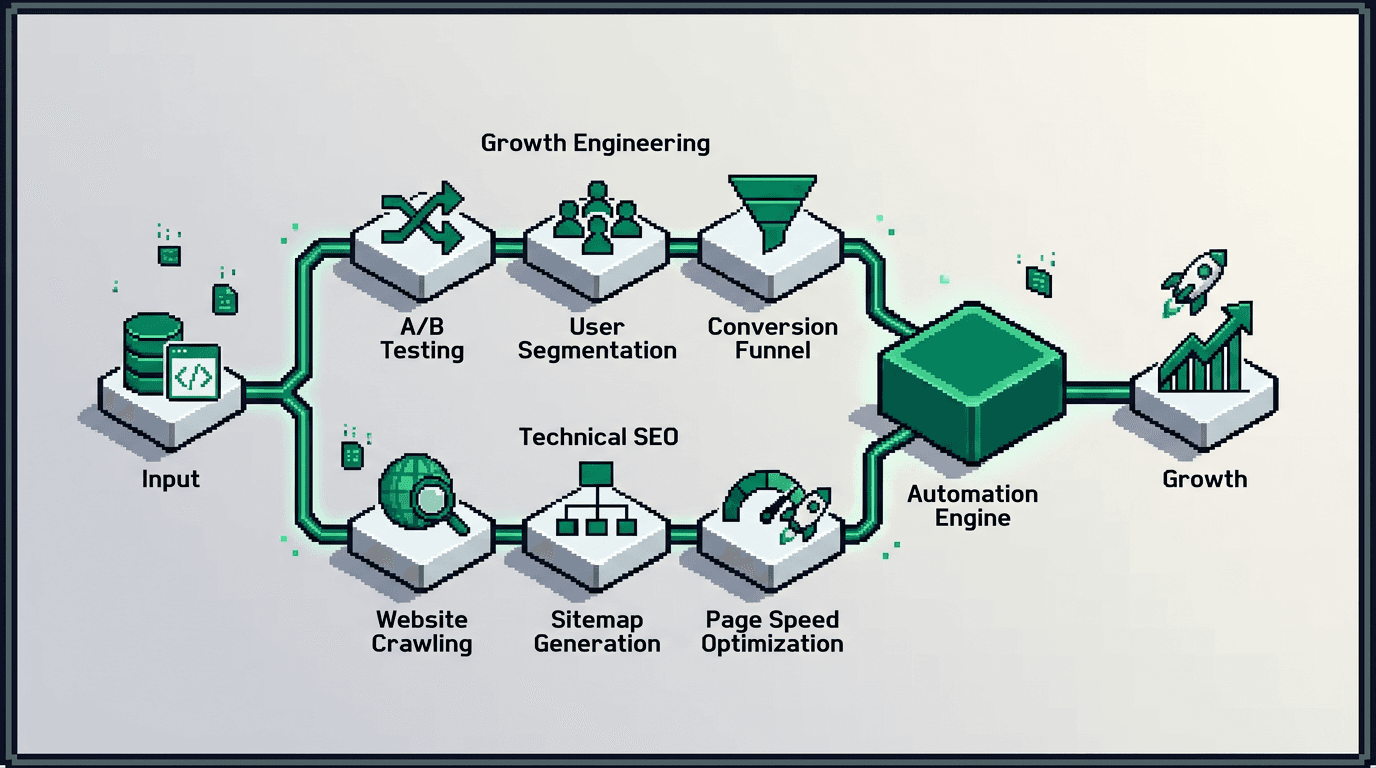
Automation separates busy teams from compound growth. You can design simple systems that remove manual steps, cut cycle time, and ship value faster.
This guide shows product operators and technical marketers how to build automation workflows that support programmatic SEO, distribution loops, and experiment loops. You will map inputs, define triggers, create QA gates, and measure outputs. The key takeaway: start small, wire QA first, then scale with repeatable execution playbooks.
What Are Automation Workflows in Growth
Automation workflows are repeatable sequences that move growth tasks from trigger to outcome with minimal human input.
Core components
- Trigger: an event that starts the flow, such as a merged PR or a new dataset row.
- Actions: atomic steps like transform, enrich, validate, publish, and notify.
- Data contracts: schemas that define fields, types, and acceptance rules.
- QA gates: checks that block bad outputs and route fixes.
- Observability: logs, metrics, and alerts tied to SLAs.
Why they matter for product teams
- Reduce wait time between ideation and impact.
- Improve consistency and quality across releases.
- Free specialists for high leverage decisions.
- Create audit trails for compliance and learning.
Planning Automation Workflows
Start with the outcome you want, not the tool you like. Write the path from input to result, list owners, and define stop conditions.
Define the goal and constraints
- Outcome: publish 100 high quality pages with programmatic SEO in 30 days.
- Constraints: one content editor, limited design bandwidth, daily deploy window.
- Dependencies: product taxonomy, analytics access, content style guide.
- Success metric: 95 percent pages pass QA on first run, under 2 percent rollback rate.
Map the system
- Inputs: source data, templates, metadata rules, assets.
- Process: transform, validate, preview, approve, publish, distribute.
- Outputs: page URLs, snippets, dashboards, alerts.
- Risks: bad data, duplicate pages, slow builds, index bloat.
Automation Workflows for Programmatic SEO
Programmatic SEO scales search pages from structured data. Automation ensures consistency and protects quality.
Data modeling and contracts
- Create a canonical schema: entity, attributes, relationships, and required fields.
- Version the schema. Add migration scripts for every change.
- Add acceptance tests: required fields present, value ranges valid, no PII leaks.
Template system for SSR React SEO
- Build SSR templates for entities and lists.
- Inject metadata from the schema: title, description, canonical.
- Render critical content server side for crawlability.
- Precompute internal links from relationships to form topic clusters.
QA gates and preview environments
- Generate per page previews with querystring keys.
- Run link checkers and lighthouse checks in CI.
- Fail the build if structured data or canonical rules break.
- Route failures to a Slack channel with page IDs and diffs.
Deployment and indexing controls
- Stage releases in batches. Start with 10 percent, observe, then scale.
- Control crawl with robots, sitemaps, and pagination rules.
- Track index coverage and soft 404s in Search Console.
Building Distribution Loops That Compound Reach
Distribution loops turn one asset into many touchpoints. Automation compresses time to ship and enforces brand safety.
Content atomization
- Slice the flagship post into snippets: quotes, stats, code, and visuals.
- Store snippets in a table with fields for channel, angle, length, and CTA.
- Generate UTM links with campaign and content IDs.
Channel specific formatting
- Create per channel templates with character limits and image ratios.
- Auto attach relevant assets from the snippets table.
- Insert CTAs that map to the next best action, not always signup.
Scheduling and pacing
- Schedule posts based on audience time zones and channel norms.
- Stagger variants to detect lift from hooks and visuals.
- Cap daily volume to avoid fatigue. Use a rolling window.
Feedback ingestion
- Collect engagement metrics per snippet and per channel.
- Auto label top performers and route to a remix queue.
- Kill underperformers after a threshold. Move learnings to the playbook.
Running Experiment Loops Without Chaos
Experiment loops test changes and compound wins. Automation maintains rigor while reducing overhead.
Hypothesis tracking and guardrails
- Standardize PRD fields: hypothesis, metric, segment, exposure, and stop rule.
- Set a minimum sample rule before reads. Pre define MDE ranges.
- Add an alert if guardrails degrade beyond a threshold.
Allocation and rollout
- Use feature flags to assign traffic and manage cohorts.
- Start with low exposure. Ramp based on power and risk.
- Auto stop if error rates or latency exceed budgets.
Analysis and decision logging
- Pre compute key metrics daily and after exposure thresholds.
- Auto generate a short decision memo with charts and a verdict tag.
- Publish to a knowledge base. Link the code, dashboards, and owners.
Execution Playbooks: From Ad hoc to System
Playbooks align people with the workflow. They define owners, steps, tools, SLAs, and acceptance checks.
Minimal blueprint template
- Owners: data, content, engineering, QA.
- Steps: ingest, transform, validate, preview, approve, publish, distribute.
- Tools: repo, CI, CMS, scheduler, analytics, and alerting.
- SLAs: preview under 30 minutes, publish window at 3 pm UTC, rollback under 10 minutes.
Acceptance checks and metrics
- Data contracts: pass schema and uniqueness checks.
- Content: pass spelling, style, and brand checks.
- Technical: no broken links, valid structured data, CLS under 0.1.
- Outcomes: publish rate, first pass QA rate, time to live, and error budget burn.
Step by Step: Build Your First Automation Workflow
Follow this path to ship a production ready automation in two weeks.
Week 1: design and dry run
1) Write the goal, constraints, and success metrics.
2) Draft the data contract and sample records.
3) Build a minimal SSR template with placeholder content.
4) Add CI checks for schema and structured data.
5) Create a preview environment and one Slack alert.
Week 2: productionization
1) Connect real data and enable batch preview.
2) Set QA thresholds and fail builds on violations.
3) Add distribution snippet generation with templates.
4) Schedule two channels with pacing rules.
5) Ship a 10 percent batch and watch dashboards for 48 hours.
Tooling Options and Fit by Use Case
Use this quick comparison to pick tools. Choose based on your stack, control needs, and team skills.
| Need | Option | Strengths | Trade offs | Best for |
|---|---|---|---|---|
| CI and checks | GitHub Actions | Native to repos, easy secrets | Longer cold starts | Small to medium teams |
| Data pipelines | Airflow | Strong DAGs, scheduling | Higher ops overhead | Data heavy orgs |
| Low code flows | Make or Zapier | Fast to prototype | Limited branching | Lean teams |
| Feature flags | LaunchDarkly | Robust targeting | Cost at scale | Product led tests |
| CMS | Headless CMS | Content modeling | Requires dev support | Programmatic SEO |
| Messaging | Slack | Fast alerts | Noise risk | Cross functional ops |
Failure Modes and Rollbacks
Design for failure. Define rollback paths before you automate.
Common failure modes
- Schema drift breaks templates.
- Duplicate content from bad keys or joins.
- Over publishing triggers crawl traps and index bloat.
- Alert fatigue hides real incidents.
Rollback strategies
- Keep a feature flag to unlist or noindex.
- Maintain a revert script for the last deploy.
- Freeze new batches while you triage data issues.
- Postmortem within 48 hours. Update checks and tests.
Measurement and Review Cadence
Measure the system, not only the outcome. Check both speed and quality.
Core metrics
- Lead time: commit to publish.
- First pass QA rate and rework rate.
- Batch failure rate and mean time to recovery.
- Organic outcomes: index coverage trend and valid clicks.
Review rhythm
- Daily: alerts, failed checks, and hotfixes.
- Weekly: metrics review, incident summaries, change requests.
- Monthly: roadmap updates, schema changes, and playbook edits.
Example Workflow: Programmatic SEO Page Factory
This example shows inputs, process, and outputs for a minimal page factory.
Inputs
- Dataset: entities with titles, summaries, and attributes.
- Templates: entity page and list page in SSR React.
- Rules: title format, meta description pattern, canonical logic.
Process
1) Ingest new rows. Validate contract.
2) Generate slugs. Check for duplicates.
3) Build pages in preview. Run lighthouse and link checks.
4) Approve batch. Publish with 10 percent canary.
5) Trigger snippet generation and schedule posts.
Outputs
- Published URLs with valid structured data.
- Snippets with UTMs scheduled across channels.
- Dashboards updated. Alerts on failures.
Governance and Compliance Considerations
Automations touch data and publishing. Add controls to stay safe.
Data handling
- Restrict PII to secure stores. Mask in logs.
- Rotate keys and audit access quarterly.
- Document data lineage for every workflow.
Editorial and brand safety
- Lock style rules in the checker config.
- Require human approval for sensitive topics.
- Keep a kill switch for public posts.
Next Actions
- Pick one workflow tied to a measurable outcome.
- Write the data contract and acceptance checks.
- Build the preview path and a single alert.
- Ship a 10 percent batch. Review, then scale.
Key Takeaways
- Start with a clear outcome and a minimal workflow.
- Write data contracts and QA gates before you scale.
- Use canary releases and rollbacks to manage risk.
- Measure speed and quality, not just traffic.
- Evolve playbooks monthly based on incidents and wins.
Small systems compound. Ship the first workflow, learn fast, and add one improvement per cycle.